Vision
Brief
The Sentry2 vision sensor integrates a variety of offline vision algorithms to recognize objects without network, and the on-board ESP8285-WiFi chip can realize the cloud-based image recognition function.
Introduction
Vision List
Vision ID |
Name |
Brief |
|---|---|---|
1 |
Return the R(red),G(green),B(blue) value and its label of each region. Up to 25 regions |
|
2 |
Detect a specified color block. It supports black, white, red, green, blue and yellow color blocks setection at the same time |
|
3 |
Support 16H5, 25H9, 36H11 Apriltag family. Up to 25 tags |
|
4 |
Find lines and return its endpoints and degrees, support 1-5 lines |
|
5 |
Training objects and categorize them. Up to 25 model data |
|
6 |
Identify special card patterns, including 10 traffic cards, 9 shape cards, and 10 number cards |
|
7 |
Face detection and recognition, support mask detection, can store 25 model data |
|
8 |
Classify 20 common objects, such as cat, car, human etc |
|
9 |
Recognition a simple QR code |
|
10 |
Running custom algorithms which is running in the ESP8285-WiFi chip on board |
|
11 |
Determine if there are moving areas in the image |
Note: Multiple visions without asterisks can be enabled at the same time. But the visions with asterisks can not running with other asterisks vision. When multiple algorithms are enabled, the speed will be slowed down
Detailed Introduction
ID:1 Color
- Brief

User can set one or up to 25 regions for color recognition and return the R(red),G(green),B(blue) value and its label of each region. The coordinate and size of each region can be configured.
- Color Label
A color label is a number use to represent a color:
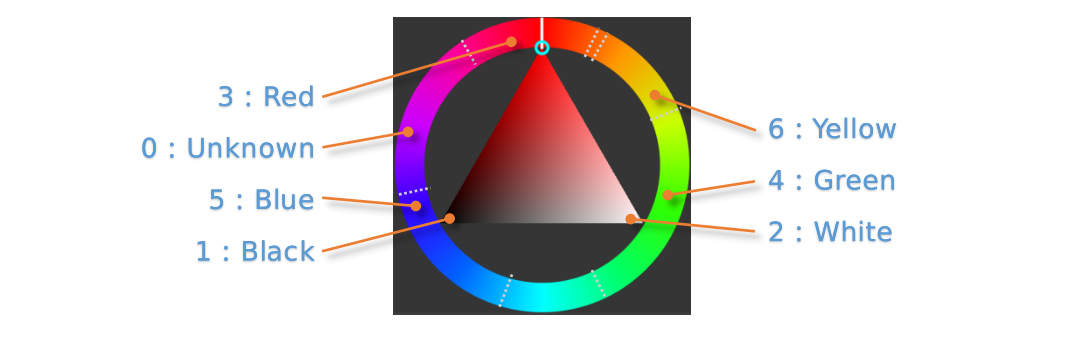
Label
Name
Label
Name
1
Black
2
White
3
Red
4
Green
5
Blue
6
Yellow
0
Unknown
Parameters
User can set regions for recognition:
Param
Brief
1
X-coordinate of the region center
2
Y-coordinate of the region center
3
Width of the region
4
Height of the region
5
None
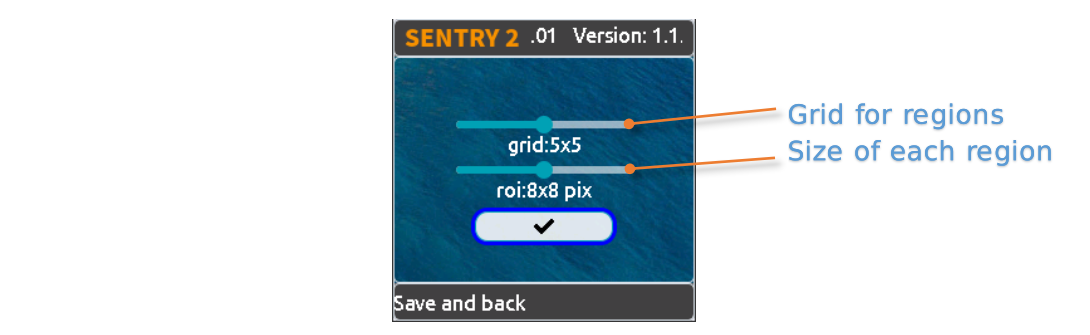
We provide several preset parameters in the UI setting page:
Grid(X x Y): 1x1、2x2、3x3、4x4、5x5、1x10、2x10、6x1、6x2
Size(W x H): 2x2、4x4、8x8、16x16、32x32
NOTE:To represent a square in the percentage coordinate system, the width and height are not equal, but conform to the 3:4 relationship. For example, if the width of a square is 12%, then its height h should be 12/3×4=16%. In the absolute coordinate system, the preset recognition area size are : 1x1, 2x3, 3x4, 6x8, 9x12
Results
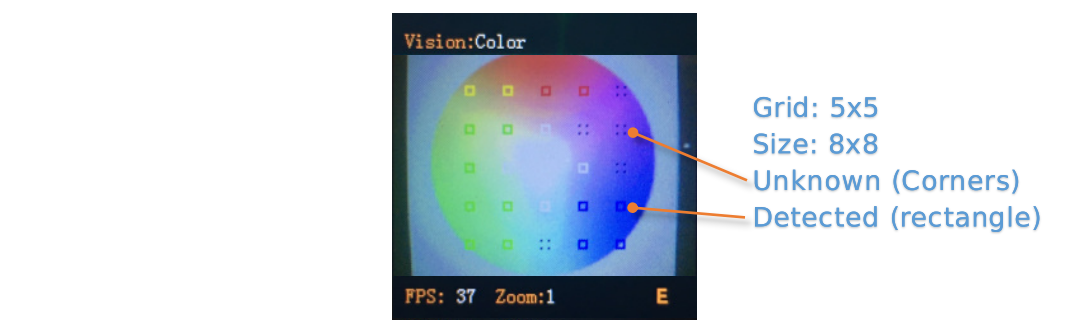
There will be a rectangular box on the screen that identifies the color, and a 4-corner box identifies the unknown color
Result
Brief
1
R, red channel value, range 0~255
2
G, green channel value, range 0~255
3
B, blue channel value, range 0~255
4
None
5
Color label
ID:2 Blob
Brief

Find a certain color block from an image and return its coordinate and size. It support mulit-color and multi-result detection. The color label has the same definition of Color vision
Parameters
User need to decide which color to be detected firstly. The width and height of the minimum color piece can be configured to reduce the false results:
Param
Brief
1
None
2
None
3
Minimum width
4
Minimum height
5
The label of Color to be detected
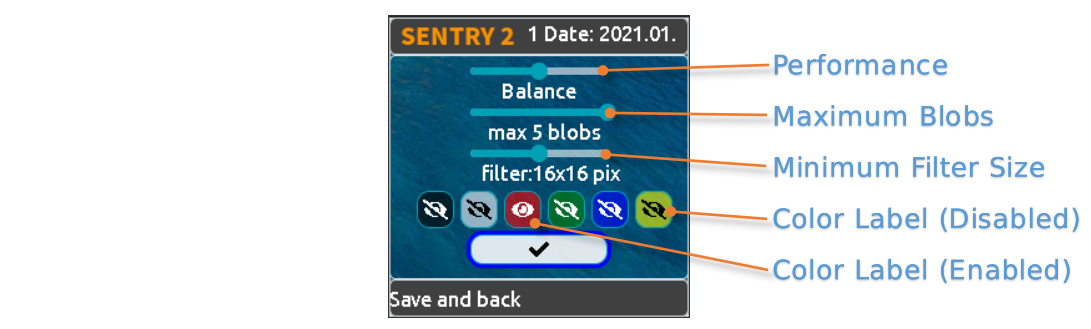
- We provide several preset parameters in the UI setting page:
- Algorithm Performance Level:
To select the performance of the vision according to different application requirements: “Sensitive”, “Balance”, and “Accurate”.
- Maximum Number of Blocks:
Support 1~5 blocks for each color
- Minimum Size of Block:
Absolute Coordinate System: 2x2, 4x4, 8x8, 16x16, 32x32, 64x64, 128x128 pixel
Percentage Coordinate System:1x1, 2x3, 3x4, 6x8, 9x12, 21x28, 42x56 %
- Color to be Detected:
An open eye icon is displayed if the color label is actived
Results
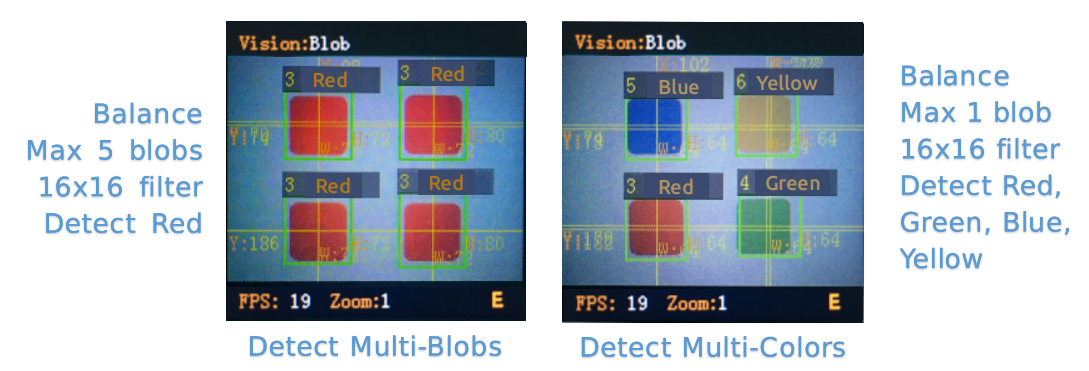
Get the results :
Result
Brief
1
X-coordinate of the block center
2
Y-coordinate of the block center
3
Width of the block
4
Height of the block
5
Color label
ID:3 Apriltag
Brief

Find apriltags from an image, support 16H5,25H9,36H11 encoding family and up to 25 results. You need to decide which encoding family to use before this vision enabled, and only one family can be process
NOTE: This vision cannot run at the same time as other vision marked with asterisks
Label

Apriltag is a set of defined black and white squares. Different codes use different numbers of squares. Each pattern has a predefined label.
Apriltag image download <https://github.com/AprilRobotics/apriltag-imgs/tree/master>
Parameters
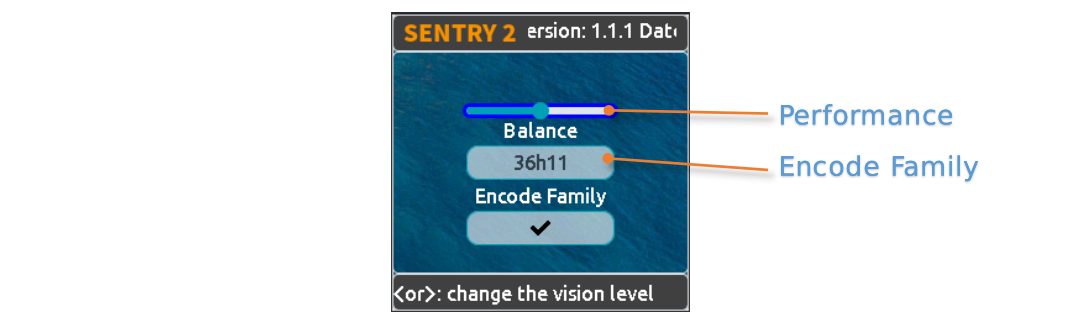
- We provide several preset parameters in the UI setting page:
- Algorithm Performance Level:
To select the performance of the vision according to different application requirements: “Sensitive”, “Balance”, and “Accurate”.
- Encoding Family:
Support “16H5”,“25H9”,“36H11”
- Results
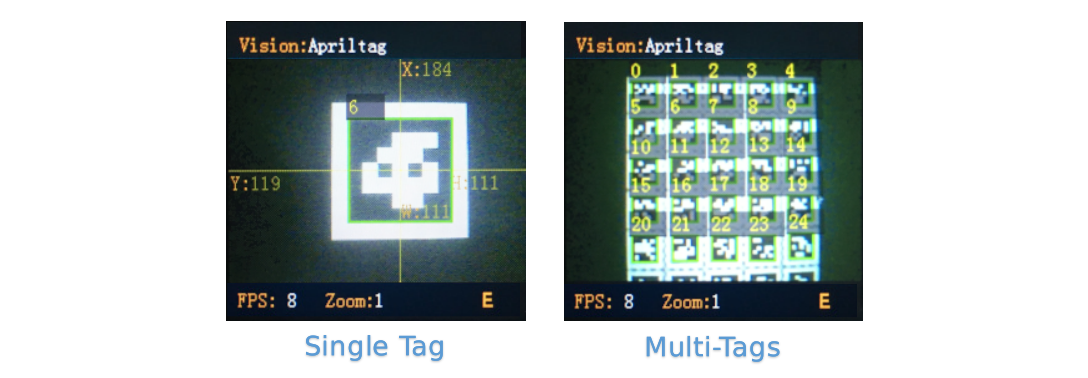
Get the results :
Result
Brief
1
X-coordinate of the tag center
2
Y-coordinate of the tag center
3
Width of the tag
4
Height of the tag
5
Label
ID:4 Line
Brief

Find one or up to 5 lines from an image and return its 2 endpoints coordinate and degrees. If it is a curve, an approximate line segment is returned
Parameters
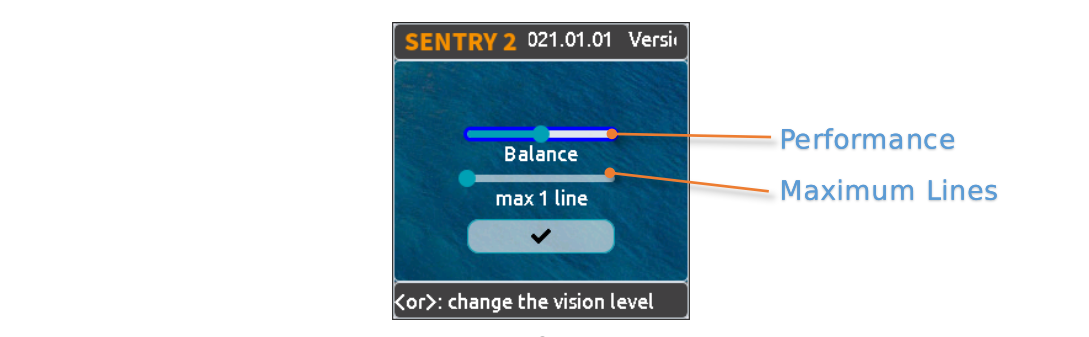
- Several parameters can be set in UI setting page:
- Algorithm Performance Level:
To select the performance of the vision according to different application requirements: “Sensitive”, “Balance”, and “Accurate”.
- Maximum Lines Number:
Range from 1 to 5
Results
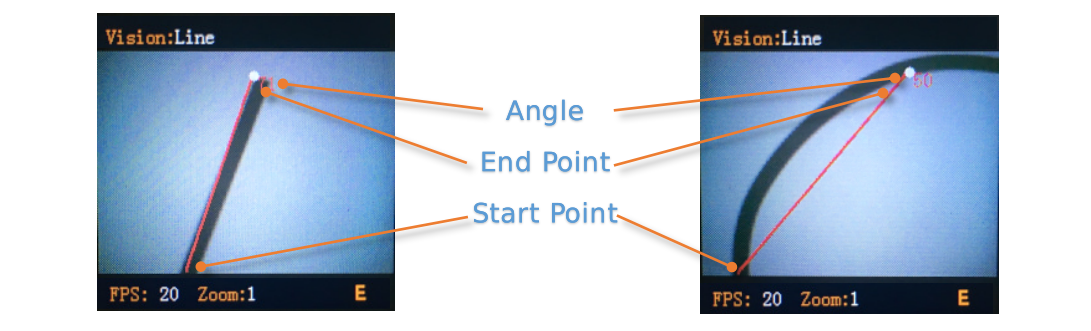
NOTE: The horizontal to the right is 0 degrees, the value is increased by counterclockwise. Upward is 90 degrees, and the horizontal to the left is 180 degrees.
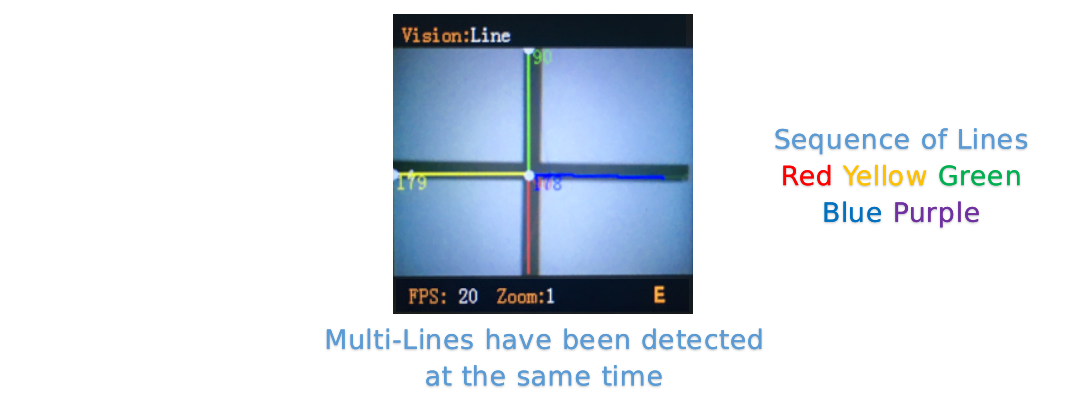
We use 5 different colors - red, yellow, green, blue, and purple - to distinguish the multi-lines
Result
Brief
1
X-coordinate of the end point of the line (upper)
2
Y-coordinate of the end point of the line (upper)
3
X-coordinate of the start point of the line (lower)
4
Y-coordinate of the start point of the line (lower)
5
Degree of the line
ID:5 Learning
Brief

Objects can be trained and recognized by this vision, up to 25 model data can be saved
Parameters
- Training New Object:
New object can be trained in the running page:
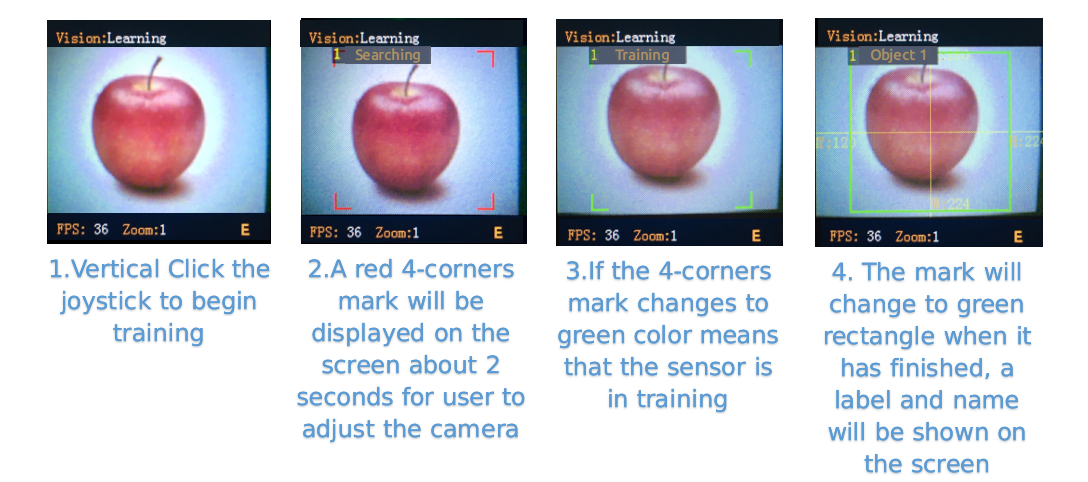
A label will be automatically assigned to the new object. The principle is: select the smallest number from the available ID
- Delete All Objects:
Vertically long press the joystick more than 2 seconds in the running page.

Param
Brief
1
None
2
None
3
None
4
None
5
Write 0 to delete this object, or write 100 to trained
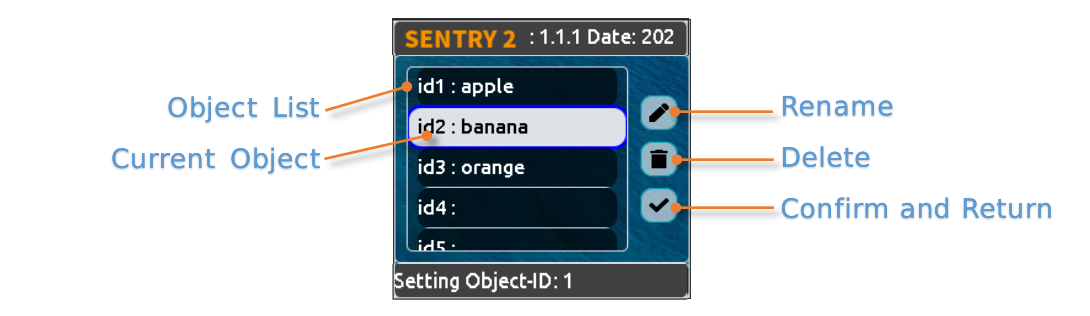
You can rename or delete the trained model in the UI setting page
Rename:
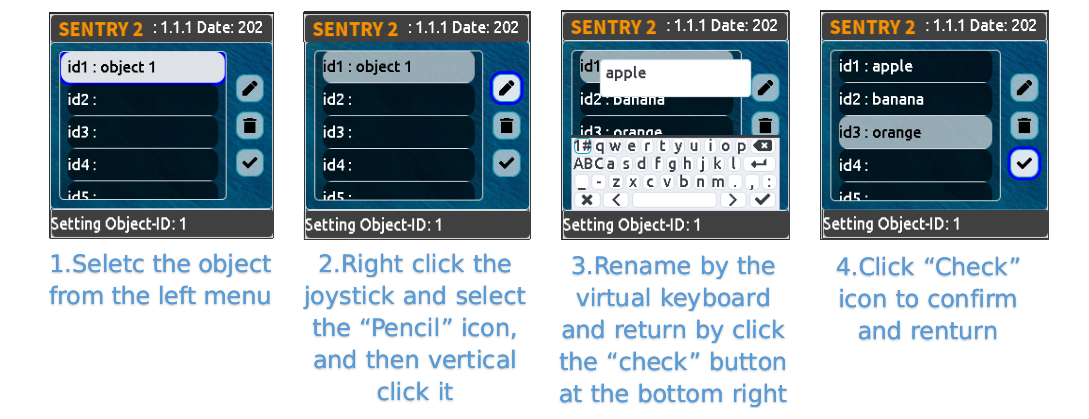
NOTE:No more than 32 characters
Delete:
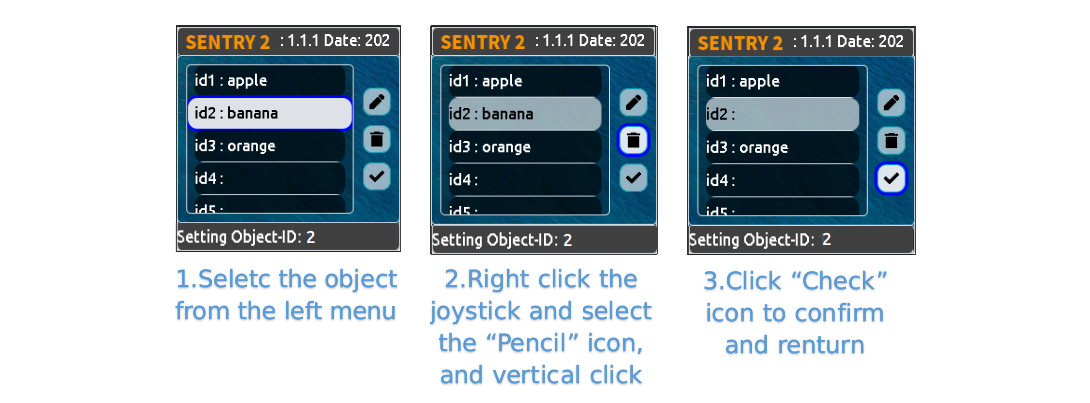
Results
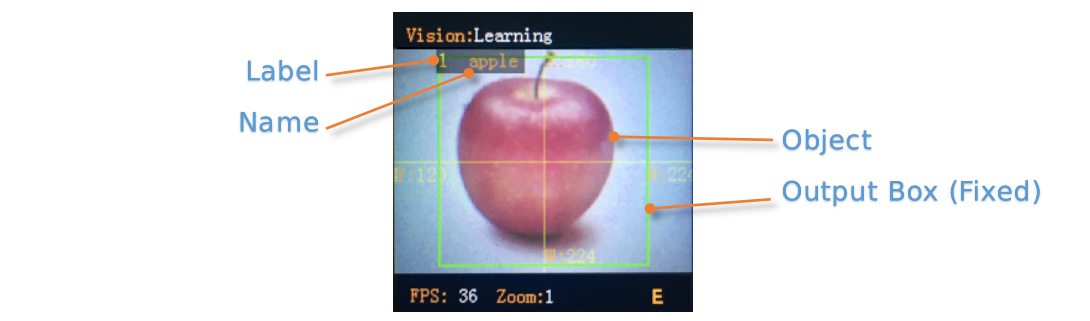
The vision can only judge the existence of the trained object, but not its coordinates and size, so the recognition box is a fixed output value
Result
Brief
1
Fixed, 160
2
Fixed, 120
3
Fixed, 224
4
Fixed, 224
5
Label
ID:6 Card
Brief

recognize a specified card in the image and return its coordinates, size, label and other information. It includes traffic cards, shape cards and numbers cards. The labels are shown in the following table
Traffic
Label
Name
Label
Name
1
Forward
2
Left
3
Right
4
Turn Around
5
Park
6
Green
7
Red
8
Speed 40
9
Speed 60
10
Speed 80
Shape
Label
Name
Label
Name
11
Check
12
Cross
13
Circle
14
Square
15
Triangle
16
Plus
17
Minus
18
Divide
19
Equal
Number
Label
Name
Label
Name
20
Num 0
21
Num 1
22
Num 2
23
Num 3
24
Num 4
25
Num 5
26
Num 6
27
Num 7
28
Num 8
29
Num 9
Parameters
None
Results
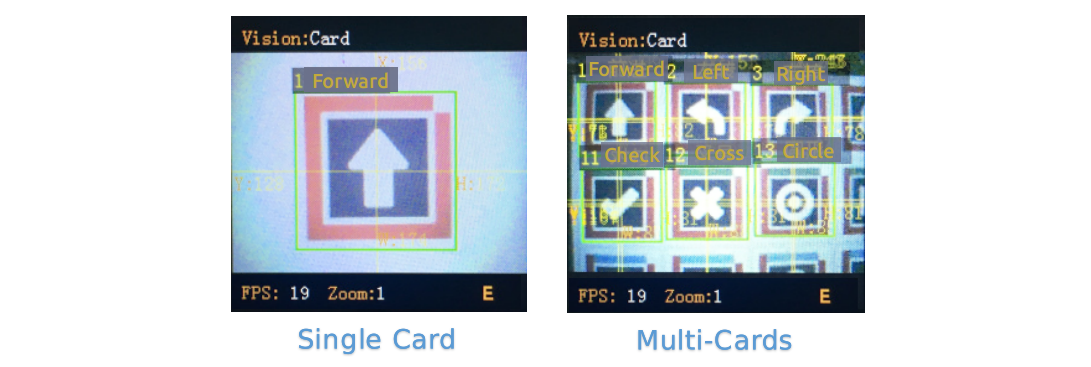
This vision can recognize multiple cards at same time, and the rotation of cards within 30 degrees can still be recognized but don’t rotate the angle too much.
Result
Brief
1
X-coordinate of the card center
2
Y-coordinate of the card center
3
Width of the card
4
Height of the card
5
Label of the card
ID:7 Face
Brief

Faces can be trained and recognized by this vision, up to 25 model data can be saved, its also support mask detection
Parameters
- Training New Face:
New object can be trained in the running page:
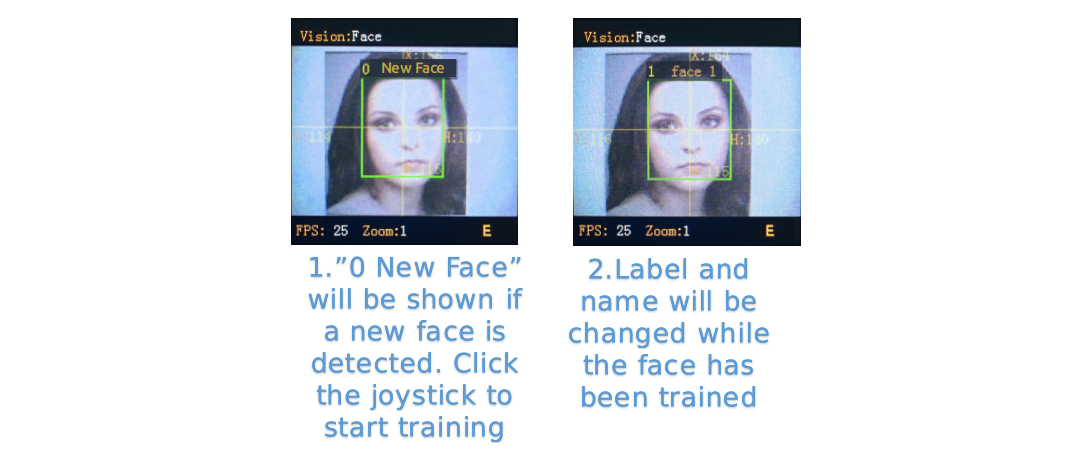
- A label will be automatically assigned to the new face.
The principle is: select the smallest number from the available ID
- Delete All Faces:
Vertically long press the joystick more than 2 seconds in the running page.
Param
Brief
1
None
2
None
3
None
4
None
5
Write 0 to delete this object, or write 100 to trained
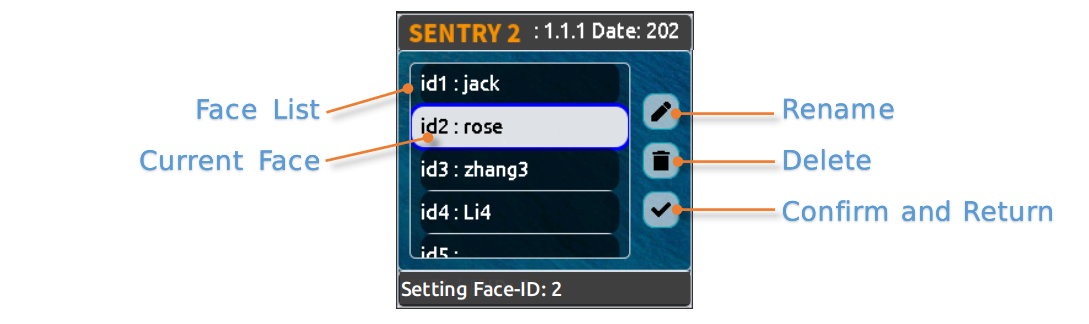
You can rename or delete the trained model in the UI setting page, refer to Learning
Results
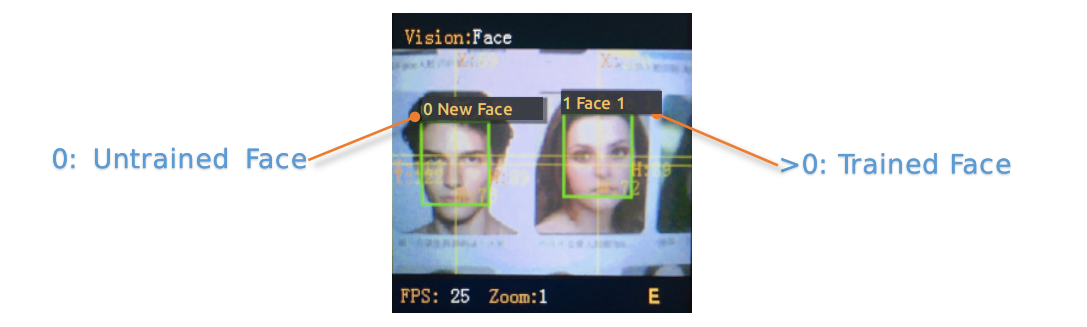
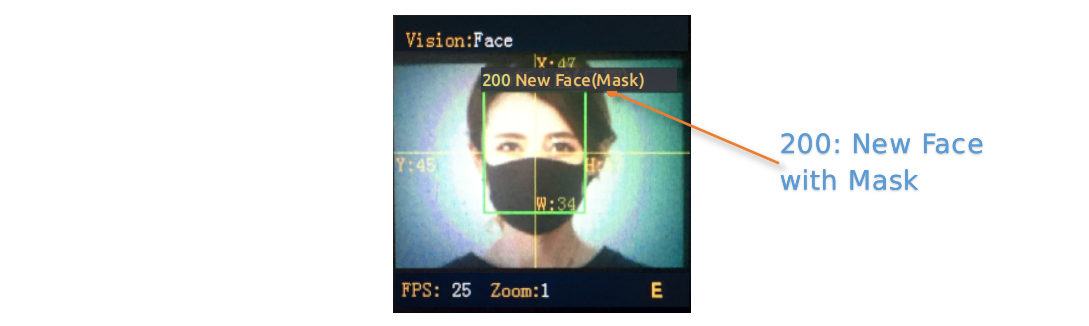
This vision support face detection (new face) and face recognition (trained face) running at the same time. New face will be assigned label 0. Specially, if a new face wearing a mask is detected, “New face (mask)” will be displayed, and the label is fixed at 200
Result
Brief
1
X-coordinate of the face center
2
Y-coordinate of the face center
3
Width of the face
4
Height of the face
5
Label, 0:new face, 200:new face with mask
ID:8 20Class
Brief

Identify 20 common types of objects and return their coordinate, size and labels, as shown in the table below.
Label
Label
Name
Label
Name
1
Airplane
2
Bicycle
3
Bird
4
Boat
5
Bottle
6
Bus
7
Car
8
Cat
9
Chair
10
Cow
11
DiningTable
12
Dog
13
Horse
14
Motorbike
15
Person
16
PottedPlant
17
Sheep
18
Sofa
19
Train
20
Tvmonitor
Parameters
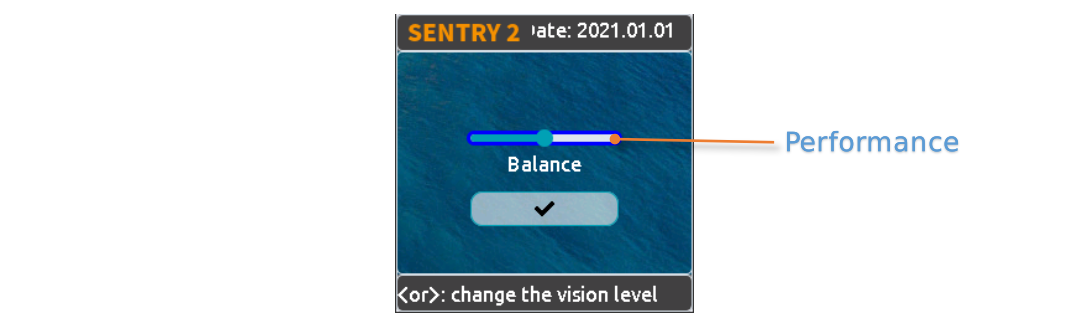
- Algorithm Performance Level:
To select the performance of the vision according to different application requirements: “Sensitive”, “Balance”, and “Accurate”.
Results
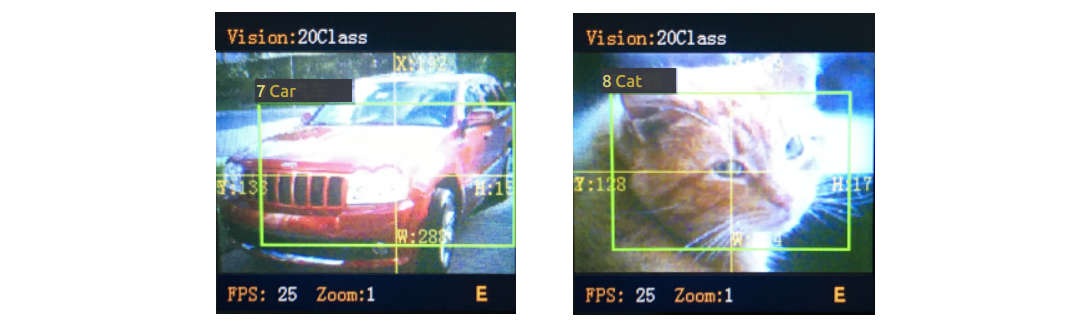
Result
Brief
1
X-coordinate of the object center
2
Y-coordinate of the object center
3
Width of the object
4
Height of the object
5
Label
ID:9 QrCode
Brief

A standard QR code (less than 25 ASCII characters) can be recognized
ASCII Table
Label
ASCII
Label
ASCII
Label
ASCII
32
空格
33
!
34
“
35
#
36
$
37
%
38
&
39
‘
40
(
41
)
42
*
43
+
44
,
45
-
46
.
47
/
48
0
49
1
50
2
51
3
52
4
53
5
54
6
55
7
56
8
57
9
58
:
59
;
60
<
61
=
62
>
63
?
64
@
65
A
66
B
67
C
68
D
69
E
70
F
71
G
72
H
73
I
74
J
75
K
76
L
77
M
78
N
79
O
80
P
81
Q
82
R
83
S
84
T
85
U
86
V
87
W
88
X
89
Y
90
Z
91
[
92
\
93
]
94
^
95
_
96
`
97
a
98
b
99
c
100
d
101
e
102
f
103
g
104
h
105
i
106
j
107
k
108
l
109
m
110
n
111
o
112
p
113
q
114
r
115
s
116
t
117
u
118
v
119
w
120
x
121
y
122
z
123
{
124
125
}
126
~
Parameters
None
Results
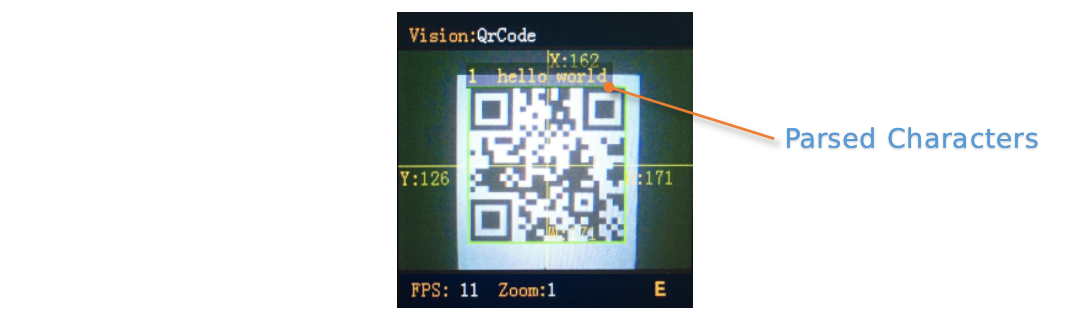
Different than other visions, this vision returns two kinds of information, attribute packet and character data
Attribute Packet
Result
Brief
1
X-coordinate of the QR Code center
2
Y-coordinate of the QR Code center
3
Width of the QR Code
4
Height of the QR Code
5
Number of characters
Character Data
Result
Brief
1
character data
2
character data
3
character data
4
character data
5
character data
ID:10 Custom
Brief

If this mode is enabled, the wifi chip will run, details:
Sentry2 WiFi Firmware Developing User Guide_V1.1.pdfParameters
Custom
Results
Custom
ID:11 Motion
Brief

Compared the pixel difference of adjacent frames to determine whether there is a motion region in the image, return its coordinate and size.
Parameters
None
Results
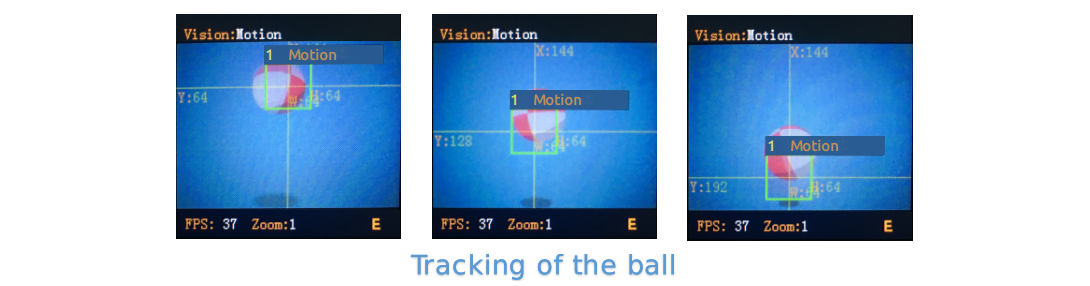
Result
Brief
1
X-coordinate of the region center
2
Y-coordinate of the region center
3
Width of the region
4
Height of the region
5
None
//end